sobota 8. februára 2014

Fungi for Acer Iconia W3-810

Fungi for Acer Iconia W3-810 
Tested on Windows 7 and Windows 8.

You can download as the freeware from the link below.
You need to have instaled Microsoft.NET Framework 3.5.
Unzip and start by exe file. You do not need instal.

Download FungiPC

pasword:  jans

There are three directories - LISTS , ITEMS and NOTES and one exe file.
You start program by the exe file.

The files of the nature items are in the ITEMS directory
(*.jpg - P1, *ph.jpg - P2, *p.jpg - P3, *m.jpg - P4, *.txx - txt file).
You can change them but you have to no change the number prefix of the file.
You can translate the *txx files.

The files of the Habitats and Groups files are in the LISTS directory .

The files of the Notes are in the NOTES directory .

After start the program you have to choose the Habitat or Group.
Then click on the listbox.
You can move the picture by the pen.
You can edit and save the notes.
You can zoom the pictures by "O" button.


Atlas Húb pre Acer Iconia W3-810 

Program môžete stiahnuť ako freeware z vyššieho linku.
Stačí rozbaliť na disk a vytvori sa adresar .
Musí byť nainštalovaný Microsoft .NET Framework 3.5.
Na Windows 8 tablete Acer Iconia W3-810 môže byť už nainštalovaný.

Enjoy
JS

piatok 31. januára 2014

Butterflies for Acer Iconia W3-810

Butterflies for Acer Iconia W3-810 
Tested on Windows 7 and Windows 8.


You can download as the freeware from the link below.
You need to have instaled Microsoft.NET Framework 3.5.
Unzip and start by exe file. You do not need instal.

Download ButterfliesPC

pasword:  jans

There are three directories - LISTS , ITEMS and NOTES and one exe file.
You start program by the exe file.

The files of the nature items are in the ITEMS directory
(*.jpg - P1, *ph.jpg - P2, *p.jpg - P3, *m.jpg - P4, *.txx - txt file).
You can change them but you have to no change the number prefix of the file.
You can translate the *txx files.

The files of the Habitats and Groups files are in the LISTS directory .

The files of the Notes are in the NOTES directory .

After start the program you have to choose the Habitat or Group.
Then click on the listbox.
You can move the picture by the pen.
You can edit and save the notes.
You can zoom the pictures by "O" button.


Atlas Motýlov pre Acer Iconia W3-810 

Program môžete stiahnuť ako freeware z vyššieho linku.
Stačí rozbaliť na disk a vytvori sa adresar .
Musí byť nainštalovaný Microsoft .NET Framework 3.5.
Na Windows 8 tablete Acer Iconia W3-810 môže byť už nainštalovaný.


Enjoy
JS

sobota 25. januára 2014

Flowers for Acer Iconia W3-810

Flowers for Acer Iconia W3-810 
Tested on Windows 7 and Windows 8.


You can download as the freeware from the link below.
You need to have instaled Microsoft.NET Framework 3.5.
Unzip and start by exe file. You do not need instal.

Download FlowersPC

pasword:  jans

There are three directories - LISTS , ITEMS and NOTES and one exe file.
You start program by the exe file.

The files of the Flowers are in the ITEMS directory
(*.jpg - P1, *ph.jpg - P2, *p.jpg - P3, *m.jpg - P4, *.txx - txt file).
You can change them but you have to no change the number prefix of the file.
You can translate the *txx files.

The files of the Habitats and Groups files are in the LISTS directory .

The files of the Notes are in the NOTES directory .

After start the program you have to choose the Habitat or Group of the Flowers.
Then click on the listbox of the Flowers.
You can move the picture by the pen.
You can edit and save the notes.
You can zoom the pictures by "O" button.


Atlas Rastlín pre Acer Iconia W3-810 

Program môžete ho stiahnuť ako freeware z vyššieho linku.
Stačí rozbaliť na disk a vytvori sa adresar FlowersPC.
Musí byť nainštalovaný Microsoft .NET Framework 3.5.
Na Windows 8 tablete Acer Iconia W3-810 môže byť už nainštalovaný.


Enjoy
JS

nedeľa 12. januára 2014

Trees for Acer Iconia W3-810

Trees for Acer Iconia W3-810 
Tested on Windows 7 and Windows 8.


You can download as the freeware from the link below.
You need to have instaled Microsoft.NET Framework 3.5.
Unzip and start by exe file. You do not need instal.

Download TreesPC

pasword:  jans

There are three directories - LISTS , ITEMS and NOTES and one exe file. You start program by the exe file.

The files of the Trees are in the ITEMS directory
(*.jpg - P1, *ph.jpg - P2, *p.jpg - P3, *m.jpg - P4, *.txx - txt file).
You can change them but you have to no change the number prefix of the file.
You can translate the *txx files.

The files of the Habitats and Groups files are in the LISTS directory .

The files of the Notes are in the NOTES directory .

After start the program you have to choose the Habitat or Group of the Trees. Then click on the listbox of the Trees.
You can move the picture by the pen.
You can edit and save the notes.
You can zoom the pictures by "O" button.


Atlas Stromov pre Acer Iconia W3-810 

Program môžete stiahnuť ako freeware z vyššieho linku.
Stačí rozbaliť na disk a vytvori sa adresar TreesPC.
Musí byť nainštalovaný Microsoft .NET Framework 3.5.
Na Windows 8 tablete Acer Iconia W3-810 môže byť už nainštalovaný.


Enjoy
JS

nedeľa 10. novembra 2013

Birds for Acer Iconia W3-810


 Atlas of the Birds for Acer Iconia W3-810 .
Tested on Windows 7 and Windows 8.


You can download as the freeware from the link below.
You need to have instaled Microsoft.NET Framework 3.5.
Unzip and start by exe file. You do not need instal.

Download BirdsPC

pasword:  jans

Look also the video here:

Video Birds

There are three directories - LISTS , ITEMS and NOTES and one exe file. You start program by the exe file.


The files of the birds are in the ITEMS directory
(*.jpg - P1, *ph.jpg - P2, *p.jpg - P3, *m.jpg - P4, *.txx - txt file, *.wav - S - sound of the bird).
You can change them but you have to no change the number prefix of the file.
You can translate the *txx files.

The files of the Habitats and Groups files are in the LISTS directory .

The files of the Notes are in the NOTES directory .

Habitats - Urban(2), Woodland(4), Farmland(3), Heatland(6), Upland(13), Wetland(7), Coastal(12).

Groups . Sea Birds(11), Water Birds(8), Birds of Pray (5), Grouse (14), Waders (15), Owls (16), WoodPeckers (17), Pipits (18), Thrushes (19),

Warblers (20), Tits (21), Crows (22), Finches (23), Buntings (24).
You can translate the words in the Index Files.

After start the program you have to choose the Habitat or Group of the Bird. Then click on the listbox of the birds.
Click on the "P1", "P2", "P3", "P4", "S" button.
You can move the picture by the pen.
You can edit and save the notes.
You can zoom the pictures by "O" button.


Atlas Vtáci pre Acer Iconia W3-810 

Program môžete ho stiahnuť ako freeware z vyššieho linku.
Stačí rozbaliť na disk a vytvori sa adresar BirdsPC.
Musí byť nainštalovaný Microsoft .NET Framework 3.5.
Na Windows 8 tablete Acer Iconia W3-810 môže byť už nainštalovaný.


Enjoy
JS

piatok 1. novembra 2013

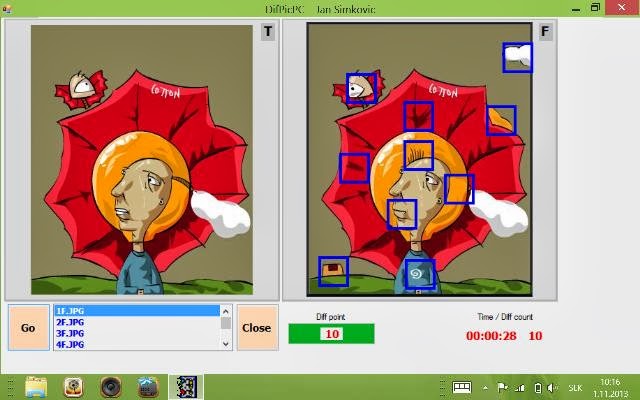
Different Picture Game Acer Iconia W3-810

Classic game tested on Windows 8 and Windows 7.


You can download as the freeware from the link below.
You need to have instaled Microsoft.NET Framework 3.5.
Unzip and start by exe file. You do not need instal.

Download DifPic

pasword:  jans

Unzip and copy the directory to your Tablet.
Start by DifPic.exe, choose the picture in the left bottom
listbox and click on the "Go" button.
The game is now starting.
There is 10 differencies.
Click on the Right picture on the different parts of the picture.

You can also create your own pictures.
Look at the ITEMS subdirectory where are three basic files:
*T.jpg - left game picture
*F.jpg - right game picture
*.txx - pixel coordinates of the differencies on the *F.jpg
picture.
Prepare your own jpg pictures (max 390x400 pixels). Copy them to
the ITEMS subdirectory.
Prepare your own txx file (10 left top coordinates of the
differencie). Box is 40x40 pixels.
Copy the txx file to the ITEMS subdirectory.
You can use XnView or IrfanView for preparing *.txx file.


Rôzne obrázky Hra pre WinCE Net 6.0

Jednoduchá hra testovaná na Windows 8 a Windows 7.
Stiahnite z vyššieho linku. Rozzipujte a adresár nakopírujte do
Tabletu.
Spustite cez DifPic.exe, vyberte obrázok v ľavom dolnom listboxe
a kliknite na "GO".
Hra sa začína. Klikajte na pravý obrázok v mieste rozdielov a
hľadajte 10 rozdielnych miest.

Pre hru si môžete vytvárať aj vlastné obrázky.
Pozrite do podadresára ITEMS, kde sú tri základné súbory:
*T.jpg - ľavý obrázok
*F.jpg - pravý obrázok
*.txx - súradnice, v pixeloch, ľavého horného rohu odlišnosti
*F.jpg obrázka.
Pripravte vlastné obrázky jpg (max 390x400 pixels) a nakopírujte
ich do ITEMS subdirectory.
Pripravte vlastný txx súbor (10 súradníc x,y ľavého horného rohu
odlišnosti). Štvorec je 40x40 pixelov.
Copy the txx file to the ITEMS subdirectory.
You can use XnView or IrfanView for preparing *.txx file.

Enjoy
JS

nedeľa 27. októbra 2013

Puzzle game for Acer Iconia W3-810


pMovePC - classical puzzle game. 
The simple game tested on Windows 8 and Windows 7.


You can use your own *.jpg pictures 320x240.
Copy them to the directory where is pMoveCE.exe.


How to play?
Click on the "Pictures" button.
Click on the picture file in the listbox.
Click on the "New Game" button (you can do more clicks) - after that start your game and your game time.
Move the tiles from the bottom to the rectangles above.
If the top-left corner of the tile is in the rectanle area then the tile is attached to the rectangle.
When the game is succesfuly finished then the time text is red.

You can download as the freeware from the link below.
You need to have instaled Microsoft.NET Framework 3.5.
Unzip and start by exe file. You do not need instal.

Download pMovePC

pasword:  jans


pMovePC - klasické puzzle.
Jednoduchá hra testovaná na Windows 8 a Windows 7.

Môžete použiť svoje vlastné obrázky *.jpg v rozlíšení 320x240.
Nakopírujte ich do adresára kde je pMoveCE.exe.

Postup:
Kliknite na "Pictures" tlačidlo.
Kliknite na obrazový súbor v listboxe.
Kliknite na tlačidlo "New Game" (môžete kliknúť aj viac krát). Po kliknutí začína hra a začína sa odpočítavať čas.
Presuňte obrazové štvorčeky zo spodu programového okna do vrchných štvorčekov. Ak sa nachádza ľavý vrchný roh obrazovej časti v štvorčeku, prichytí sa obrazová časť do štvorčeka.
Ak je hra úspešne ukončená, ukozovateľ času očervenie.

Program pMovePC je môj vlastný a môžete ho stiahnuť ako freeware z
vyššieho linku.
Stačí rozbaliť a nakopírovať na disk.
Musí byť nainštalovaný Microsoft .NET Framework 3.5.
Na Windows 8 tablete Acer Iconia W3-810 môže byť už nainštalovaný.


Enjoy
JS