streda 8. novembra 2017

Guess Number Android game

Guess Number Android game.

My Simple Android game .


You can download the APK file for free  HERE.


Enjoy
Jan Simkovic

----------------------------------------------------------------------------------------

Hádaj číslo pre Android .

Jednoduchá hra pre Android.
Stiahnuť APK súbor môžete zdarma vyššie - kliknutím na "HERE" .

utorok 7. novembra 2017

B4A - the best way to develop native Android apps

B4A - the best way to develop native Android apps.


Would you like to make the programs for Android OS ?

Are you the beginner ?

OR

Do you migrate from Visual BASIC or from another BASIC ?

OR

Would you like to make the APPs for Android quickly and simply ?


You need :


B4A from Anywhere Software – The simple way to develop native Android apps.

https://www.b4x.com/b4a.html


Look HERE.


Look also at the YouTube for B4A or Basic4Android.


B4A is Basic For Android.
B4A uses the Basic as the programming language with Visual Designer.
There is a lot of examples on the NET.
B4A has god very good support.
Good price.
You can download also Trial Version.

Android as Mobile Device OS

Android as Mobile Device OS 

For me is Windows Mobile or WinCe better then Android.
I think Android is more phone OS and gamming OS then OS for solid work.
But there is a lot of devices and APKs to be ignored Android as mobile device OS.
And what will be with Windows Mobile or WinCe ?

HARDWARE.

There is a lot of devices with Android OS.


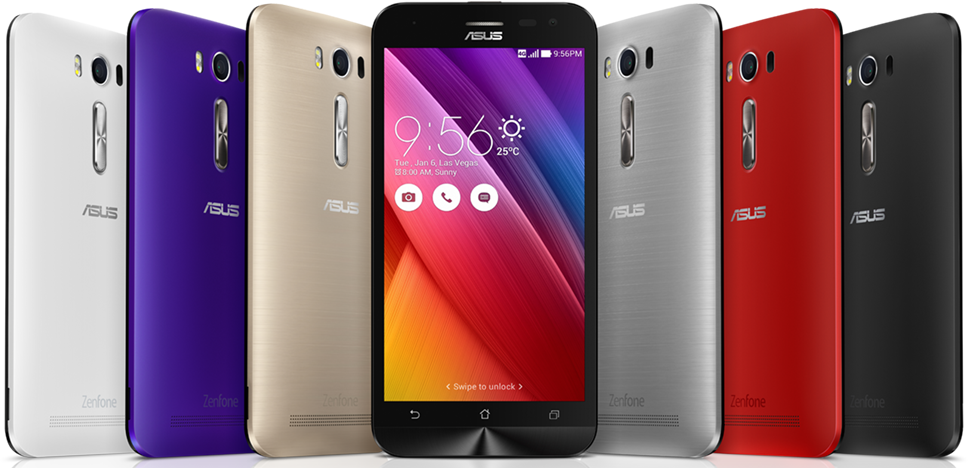
I have got Asus ZenFone 2 Laser.

1) Good GPS.
2) Memory 2 GB / 32 GB.
3) All sensors what I need.
4) Laser Rangefinder (unfortunately max 0.5 m).
5) Buttons are on the top and back of device not on left and right side of the device.

Another special devices:

Motorcycle GPS 5 inch

Car GPS Navigation 7 inch

Car GPS Navigation DVR Camera Video Recorder

Mini Phone

Waterproof Phablet


SOFTWARE.

A lot of programs.

Google Play is not for me.

I prefere to instal APK files myself.

You can download them here:

http://www.apkmirror.com/
http://www.apkpure.com
https://apk-dl.com/

or

1) Choose apk on the https://play.google.com/store/apps

2) Replace "oo" with "DL"

Replace
https://play.google.com/store/apps/details?id=com.my.hc.rpg.kingdom.simulator
with
https://play.gDLgle.com/store/apps/details?id=com.my.hc.rpg.kingdom.simulator

3) Press Enter.


HOW TO INSTAL APK FILE.

Look at:

https://www.asus.com/en/support/faq/1005261/

Step1. Copy Android APK files to SD card or internal storage.
Download the APK files of the app you need to install on your Android Device.
Step2. Enable Unknown Sources.
Go to "Settings" >>" Security ">> Check the box "Unknown sources"
Step3. To install APK files manually on your Android Device.
a. Use the file manager to explore the APK application.
b. Click on the APK files to open and hit "install ".


HOW TO UNINSTAL APK FILE.

Long Press finger on the program icon and move the icon in the bin (Delete).

----------------------------------------------------------------------------------------------------------------

Android ako OS mobilných zariadení 

Pre mňa Android zatial ešte neprekonal systém Windows Mobile ani WinCe. Nehovorím o Windows 10,7,XP.
Stále ho vnímam ako systém pre mobilné telefóny a ako systém hravý, nie určený pre serióznu prácu.
Ale vzhľadom na veľké množstvo zariadení sa nedá ignorovať.
A predsa len som našiel alebo aj vytvoril niekoľko programov pre serióznu prácu.

V čom sa mi zdá, že neprekonal systém Windows Mobile alebo WinCE ?
1) Preháňa to s bezpečnosťou - vyžaduje povolenie takmer na všetko.
2) Práca s SD kartou ako s pamäťou je nočná mora programátora.
3) Práca s vektorovou grafikou pri mapovaní je nemožná.
4) Práca s rastrovou grafikou pri mapovaní je des.

Čo je prínos?
1) Senzory takmer na všetko čo potrebujem.
2) GPS zabudovaná takmer do každého zariadenia.
3) Výber z nepreberného množstva prístrojov a zariadení.
4) Mobilita.

A všeobecná slabina všetkých mobilných zariadení? Šťava.
Potrebujem výdrž na jedno nabitie baterie aspoň 5 dní intenzívnej práce minimálne 8 hodín denne.
Ano viem PowerBanky a lavičky v parkoch.

Mobilné zariadenia posudzujem s ohľadom na praktické využitie pre svoju prácu - nie prioritne ako telefón.

HARDWARE.

Tona rôznych prístrojov.

Zaobstaral som si Asus ZenFone 2 Laser - zdal sa mi praktický pre prácu.
1) Dobrá GPS.
2) RAM 2 GB, interná pamäť 32 GB.
3) Všetky senzory čo potrebujem.
4) Laser - prvá lastovička so zabudovaným laserovým dialkomerom (žiaľ len do 0,5m).
5) Ovládacie tlačidlá navrchu a vzadu - nie na bokoch, takže ho držím bez strachu, že stlačím ovládacie tlačidlo.

SOFTWARE.

Tona rôznych programov.

Obchod Google Play je des.
Preferujem APK inštalačné súbory, ktoré mám archivované a môžem si ich kedykoľvek nainštalovať a zmazať.

Sťahujte tu:

http://www.apkmirror.com/
http://www.apkpure.com
https://apk-dl.com/

alebo

1) Vyhľadajte appku na https://play.google.com/store/apps

2) Miesto "oo" dajte "DL"

3) Takže vo vrchnom vyhľadávacom riadku prehliadača to vyzerá po vyhľadaní appky takto :
https://play.gDLgle.com/store/apps/details?id=com.my.hc.rpg.kingdom.simulator
a nie
https://play.google.com/store/apps/details?id=com.my.hc.rpg.kingdom.simulator

4) Daj Enter.


AKO NAINŠTALOVAŤ APK SÚBOR.

Pozri:

https://www.asus.com/cz/support/faq/1005261/

AKO ODINŠTALOVAŤ APK SÚBOR.

Podržte prst na ikone programu a potiahnite ju do koša (Odstrániť).


sobota 8. februára 2014

Fungi for Acer Iconia W3-810

Fungi for Acer Iconia W3-810 
Tested on Windows 7 and Windows 8.

You can download as the freeware from the link below.
You need to have instaled Microsoft.NET Framework 3.5.
Unzip and start by exe file. You do not need instal.

Download FungiPC

pasword:  jans

There are three directories - LISTS , ITEMS and NOTES and one exe file.
You start program by the exe file.

The files of the nature items are in the ITEMS directory
(*.jpg - P1, *ph.jpg - P2, *p.jpg - P3, *m.jpg - P4, *.txx - txt file).
You can change them but you have to no change the number prefix of the file.
You can translate the *txx files.

The files of the Habitats and Groups files are in the LISTS directory .

The files of the Notes are in the NOTES directory .

After start the program you have to choose the Habitat or Group.
Then click on the listbox.
You can move the picture by the pen.
You can edit and save the notes.
You can zoom the pictures by "O" button.


Atlas Húb pre Acer Iconia W3-810 

Program môžete stiahnuť ako freeware z vyššieho linku.
Stačí rozbaliť na disk a vytvori sa adresar .
Musí byť nainštalovaný Microsoft .NET Framework 3.5.
Na Windows 8 tablete Acer Iconia W3-810 môže byť už nainštalovaný.

Enjoy
JS

piatok 31. januára 2014

Butterflies for Acer Iconia W3-810

Butterflies for Acer Iconia W3-810 
Tested on Windows 7 and Windows 8.


You can download as the freeware from the link below.
You need to have instaled Microsoft.NET Framework 3.5.
Unzip and start by exe file. You do not need instal.

Download ButterfliesPC

pasword:  jans

There are three directories - LISTS , ITEMS and NOTES and one exe file.
You start program by the exe file.

The files of the nature items are in the ITEMS directory
(*.jpg - P1, *ph.jpg - P2, *p.jpg - P3, *m.jpg - P4, *.txx - txt file).
You can change them but you have to no change the number prefix of the file.
You can translate the *txx files.

The files of the Habitats and Groups files are in the LISTS directory .

The files of the Notes are in the NOTES directory .

After start the program you have to choose the Habitat or Group.
Then click on the listbox.
You can move the picture by the pen.
You can edit and save the notes.
You can zoom the pictures by "O" button.


Atlas Motýlov pre Acer Iconia W3-810 

Program môžete stiahnuť ako freeware z vyššieho linku.
Stačí rozbaliť na disk a vytvori sa adresar .
Musí byť nainštalovaný Microsoft .NET Framework 3.5.
Na Windows 8 tablete Acer Iconia W3-810 môže byť už nainštalovaný.


Enjoy
JS

sobota 25. januára 2014

Flowers for Acer Iconia W3-810

Flowers for Acer Iconia W3-810 
Tested on Windows 7 and Windows 8.


You can download as the freeware from the link below.
You need to have instaled Microsoft.NET Framework 3.5.
Unzip and start by exe file. You do not need instal.

Download FlowersPC

pasword:  jans

There are three directories - LISTS , ITEMS and NOTES and one exe file.
You start program by the exe file.

The files of the Flowers are in the ITEMS directory
(*.jpg - P1, *ph.jpg - P2, *p.jpg - P3, *m.jpg - P4, *.txx - txt file).
You can change them but you have to no change the number prefix of the file.
You can translate the *txx files.

The files of the Habitats and Groups files are in the LISTS directory .

The files of the Notes are in the NOTES directory .

After start the program you have to choose the Habitat or Group of the Flowers.
Then click on the listbox of the Flowers.
You can move the picture by the pen.
You can edit and save the notes.
You can zoom the pictures by "O" button.


Atlas Rastlín pre Acer Iconia W3-810 

Program môžete ho stiahnuť ako freeware z vyššieho linku.
Stačí rozbaliť na disk a vytvori sa adresar FlowersPC.
Musí byť nainštalovaný Microsoft .NET Framework 3.5.
Na Windows 8 tablete Acer Iconia W3-810 môže byť už nainštalovaný.


Enjoy
JS

nedeľa 12. januára 2014

Trees for Acer Iconia W3-810

Trees for Acer Iconia W3-810 
Tested on Windows 7 and Windows 8.


You can download as the freeware from the link below.
You need to have instaled Microsoft.NET Framework 3.5.
Unzip and start by exe file. You do not need instal.

Download TreesPC

pasword:  jans

There are three directories - LISTS , ITEMS and NOTES and one exe file. You start program by the exe file.

The files of the Trees are in the ITEMS directory
(*.jpg - P1, *ph.jpg - P2, *p.jpg - P3, *m.jpg - P4, *.txx - txt file).
You can change them but you have to no change the number prefix of the file.
You can translate the *txx files.

The files of the Habitats and Groups files are in the LISTS directory .

The files of the Notes are in the NOTES directory .

After start the program you have to choose the Habitat or Group of the Trees. Then click on the listbox of the Trees.
You can move the picture by the pen.
You can edit and save the notes.
You can zoom the pictures by "O" button.


Atlas Stromov pre Acer Iconia W3-810 

Program môžete stiahnuť ako freeware z vyššieho linku.
Stačí rozbaliť na disk a vytvori sa adresar TreesPC.
Musí byť nainštalovaný Microsoft .NET Framework 3.5.
Na Windows 8 tablete Acer Iconia W3-810 môže byť už nainštalovaný.


Enjoy
JS